


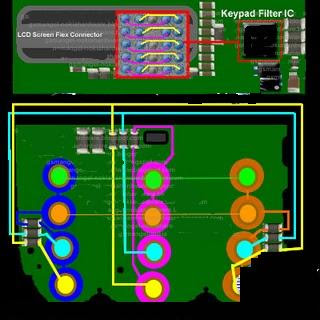


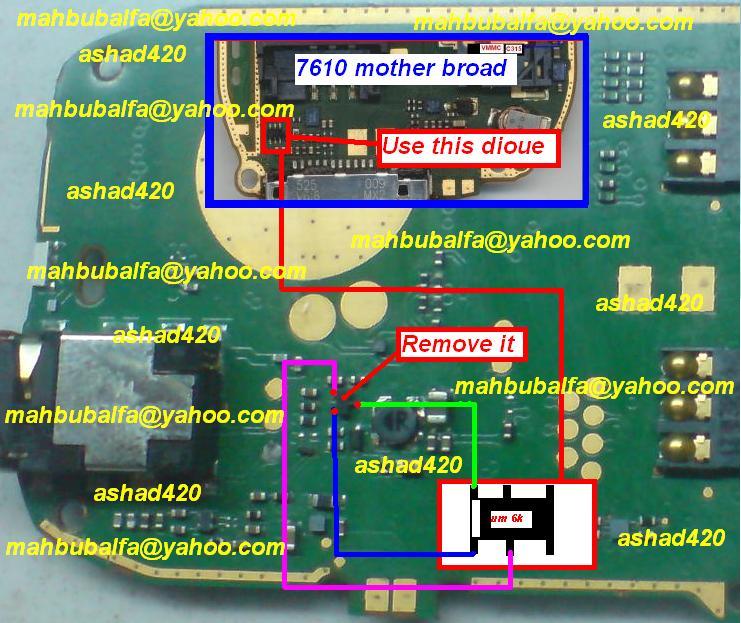
Symphony B25 (MTK-6252)
INFO-v07LCSH52_IBU_6432_10A_PCB01_GPRS_MT6252_S01.L8AVH 02_11_08_1_1T06M0728_M806.BIN
(Symphony B25_6252_SF_8MB)




Way to Jailbreak iPhone 4 On iOS 5.1 With Redsnow Mac OS X ways

This tutorial will help you to jailbreak your iPhone 4 using Redsnow .
First of all i tell you that it is tethered jailbreak so you
have to connect your iPhone with Mac computer and re-run redsnow to
boot your iPhone 4 into fully operational state every time
your iphone loses power. I am also telling you that this jaolbreak will
not work on iPhone 4S and that iBooks will not work correctly
until iPhone Dev-Team implement a patch that will fix this.
To jailbreak follow these steps .
Step 2: Once download process is completed start RedSn0w 0.9.10b6 launcher and click Jailbreak button located in middle of your window
Step 3: When the next window shows up, connect your iPhone 4 with your Mac using USB cable and power off your iPhone.


Step 5: When you click Next button simply follow instructions inside redsn0w window and continue clicking Next, after every step you perform on your iPhone (those steps you can find below)
- Hold down the Power (corner) button for 3 seconds
- Without releasing the Power button, also hold down the Home (bottom center) button for 10 seconds
- Without releasing the Home button, release the Power button BUT KEEP holding the Home button for 15 seconds
Step 6: After
you have successfully entered in DFU mode with your iPhone 4, redsn0w
will begin preparing your iPhone 4 for the Jailbreak

Step 7: Once
redsn0w is finished preparing your iPhone 4 for Jailbreak a new window
will show up where you need to specify options to go along with
Jailbreak. You can specify any option you want but I suggest you to
choose only Install Cydia and click Next

Step 8: Once you click next the Jailbreak process will begin, DO NOT interrupt this
process and wait until it’s finished. When jailbreak process is
finished iPhone will boot up and stuck at Apple logo. If this happens
to you it’s because this is a tethered jailbreak and you will
need to boot tethered with redsn0w in order to make your iPhone work.
Step 9: To boot your iPhone using redsn0w lunch redsn0w again and click Extras button and then choose Just bootbutton
Step 10: After that you will simply need to put your iPhone into DFU mode again.


How To Block Unwanted Calls On iPhone iOS

There are a couple solutions/workarounds that you can implement:
1) For those of you that are jailbroken, there is an app called iBlacklist that will allow you to filter incoming calls and SMS text messages. This is not a free app, but at it’s current price of $12.00 (one-time purchase), it can pay for itself fairly quickly vs. pricey provider solutions.
2) Don’t block calls, but silence them with a silent ringtone. This will still allow the calls to come through, but will silence the ring so you won’t even notice. To set this up, download this iPhone silent ringtone , import it into iTunes, and sync it to your iPhone. On your iPhone, add the number you want to block/silence to your contacts and set the silent ringtone as that contact’s custom ringtone.
How To Find IMEI Number Of Your iPhone ways
w To Find IMEI Number Of Tour iPhone :
havel covered two different methods you can use in order to find your iPhone IMEI (International Mobile Station Equipment Identity) number. IMEI is used by cellphone networks in order to identify devices. If someone steal you iPhone, all you have to do is contact your network provider and tell them to block the phone using the IMEI number.


Step 2: From below tabs select Keypad.
Step 3: Now type in following code *#06# and tap on Dial.
Step 4: On your screen you should see your IMEI number.
havel covered two different methods you can use in order to find your iPhone IMEI (International Mobile Station Equipment Identity) number. IMEI is used by cellphone networks in order to identify devices. If someone steal you iPhone, all you have to do is contact your network provider and tell them to block the phone using the IMEI number.
There are few ways you can find your IMEI number in iPhone, and in this tutorial I will show you two of them.
From iOS menu
Step 1: From your Springboard tap on Settings.
Step 2: From Settings, tap on General option.
Step 3: Now tap on About located at the top.
Step 4: Scroll the options all the way down and around the middle you should see your IMEI number (its right below Bluetooth).
Using Dial
Step 1: From your Springboard tap on Phone.'Step 2: From below tabs select Keypad.
Step 3: Now type in following code *#06# and tap on Dial.
Step 4: On your screen you should see your IMEI number.


Unlock iPhone iOS 6.1 Using Ultrasn0w Fixer

This Tutorial will help you to unlock iOS 6.1 Ultrasn0w free unlocking
tool that is compatible with older basebands, to preserve your iOS
6.1 base band you need to create custom iOS 6.1 iPSW using
Redsn0w 0.9.15b3.
- Baseband 05.13.01 on iPhone 3GS
- Baseband 05.11.07 on iPhone 3GS
- Baseband 05.12.01 on iPhone 3GS
- Baseband 04.26.08 on iPhone 3GS
- Baseband 06.15.00 on iPhone 3GS
Just follow these simple steps and your job will be done without any difficulty
Step 1: Jailbreak your iPhone using our guide.
Step 2: Launch Cydia from your device.
Step 3: Go to Manage > Sources. Tap on Edit, which is located at the top right corner of the screen.
Step 4: Enter the following URL repository: http://repo,iparelhos,com
Step 5: Tap on Add Source.
Step 6: A package for ultrasn0w fixer 6.1 will be displayed. Tap on it to start installation.
Step 7: Download the official Ultrasn0w 1.2.7 tool and that’s it.
If you have some better solution please share it with us .

Jailbreak ALL iOS 6.0 to 6.x.x Devices With Evasi0n 1.4 evasi0n - iOS 6.0-6.1.2 Jailbreak ways

Version 1.4
-Support For 6.1.2 On All iPhone and iPad And iPod
Version 1.3
- Support for 6.1.1 on the iPhone 4S.
Version 1.2
- Disable OTA updates.
- Correct timezone issue in evasi0n binary if client fails to correct it.
Version 1.1
- prevent Weather app from appearing on iPads.
- mitigated the long reboot issue.
- fix issue with not working after connecting multiple iOS devices
- fix blinking of the jailbreak instructions on OS X.
- codesigned Mac app.
Version 1.0
- first public release
Requirements
-5 minutes of your time!
-A computer, running Windows (XP minimum), Mac OS X (10.6 minimum) or Linux (x86 / x86_64).
-An iPhone, iPad or iPod running iOS 6.0 through 6.1 (you may check in Settings / General / About => Version).
-A USB cable to connect the device to the computer.
Important! Read me!
-Backup your device using iTunes (or iCloud) before using evasi0n. If something breaks, you'll always be able to recover your data.
-Please disable the lock passcode of your iOS device before using evasi0n. It can cause issues.
-Avoid all iOS and iTunes related tasks until evasi0n is complete. Why not just enjoy a brief break from the computer to stretch your legs?.
-If the process gets stuck somewhere, it's safe to restart the program, reboot the device (if necessary by holding down Power and Home until it shuts down), and rerun the process.
-If you get an error on OS X 10.8 saying that evasi0n can't be opened, control-click (or right-click) the app and on the revealed context menu, choose 'Open.' On the ensuing dialogue box, choose 'Open' as well.
Official Mirrors
Linux
Windows
Non Official Mirrors
iphone 4GS China All Hardwares

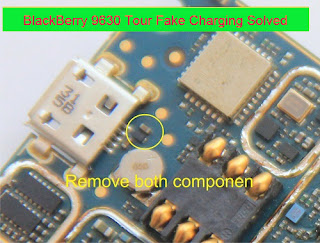
Charging Solution,Fake Charging Solution.
DOWNLOAD


Blackberry MEP Reader, Code Calculator waya

calculate codes from cyclone..coz' connecting USB in cyclone sometimes takes hard
Download

Sking S535 Flash File Download Here (Samsung Galaxy S3 Mini Copy)
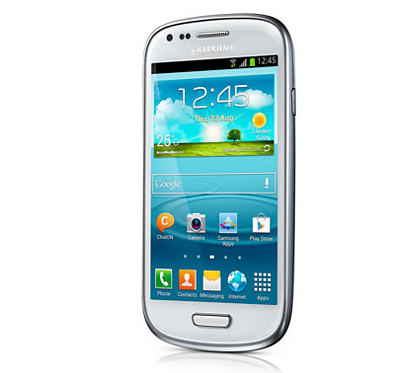 Nice copy paste ............... Ha Ha Ha
Orignal link here
Sking S535 Flash File Download Here (Samsung Galaxy S3 Mini Copy)
>>> Getting Mobile Connection Info...
VCC Pin:
GND Pin:5,
Signal Pin:1, 2, 3, 4,
>>> Scanning Mobile PinOut...
>>> USB Pinfind No need Hold Mobile Power key...
USB Pin Out: D+:3 D-:2
>>> Searching Mstar Driver...
For Mstar 853XB CPU;You need Hold Down the Power KEY.
Find Mstar DriverI:\ --> GCREADER
CPU_ID:0x00508003
CPU Name:MSW8533D
Connecting Mstar CPU of the Mobile....
>>> Downloading First Boot...
>>> Downloading Second Boot...
BOOT version: 0x050618
Mobile RAM: 0x00400000
Flash Name:SPANSION_S71NS256RC0
Flash ID:0x00011703
Flash Size:0x02000000 -> 32M
>>> Initializing Boots...
>>> Reading Flash...
Reading Flash Done...
Sking S535 Flash File Download Here (Samsung Galaxy S3 Mini Copy)
>>> Getting Mobile Connection Info...
VCC Pin:
GND Pin:5,
Signal Pin:1, 2, 3, 4,
>>> Scanning Mobile PinOut...
>>> USB Pinfind No need Hold Mobile Power key...
USB Pin Out: D+:3 D-:2
>>> Searching Mstar Driver...
For Mstar 853XB CPU;You need Hold Down the Power KEY.
Find Mstar DriverI:\ --> GCREADER
CPU_ID:0x00508003
CPU Name:MSW8533D
Connecting Mstar CPU of the Mobile....
>>> Downloading First Boot...
>>> Downloading Second Boot...
BOOT version: 0x050618
Mobile RAM: 0x00400000
Flash Name:SPANSION_S71NS256RC0
Flash ID:0x00011703
Flash Size:0x02000000 -> 32M
>>> Initializing Boots...
>>> Reading Flash...
Reading Flash Done...
DOWNLOAD
download htc desire v dual sim pc suite
You need to download the HTC Sync Manager
from the official site which is provided in the link. Just click on it
and get directed to the page. Download and install the application and
then sync your device. It should work for you well. Hope things work
for you and if it does not do let us know.
Subscribe to:
Posts (Atom)

